
Table of Contents
In today’s evolving threat landscape, small and medium-sized businesses (SMBs) are no longer flying under the radar. In fact, nearly half of all cyberattacks now target SMBs, exploiting the limited resources and outdated defenses that many still rely on. The responsibility often falls squarely on the shoulders of IT managers—those balancing performance, uptime, and security on lean budgets and tight timelines.
This is where cost-effective cybersecurity controls come into play.
You don’t need an enterprise-sized wallet to protect your business like one. With the right strategy, IT leaders can deploy high-impact, budget-conscious security solutions that meaningfully reduce risk without adding complexity.
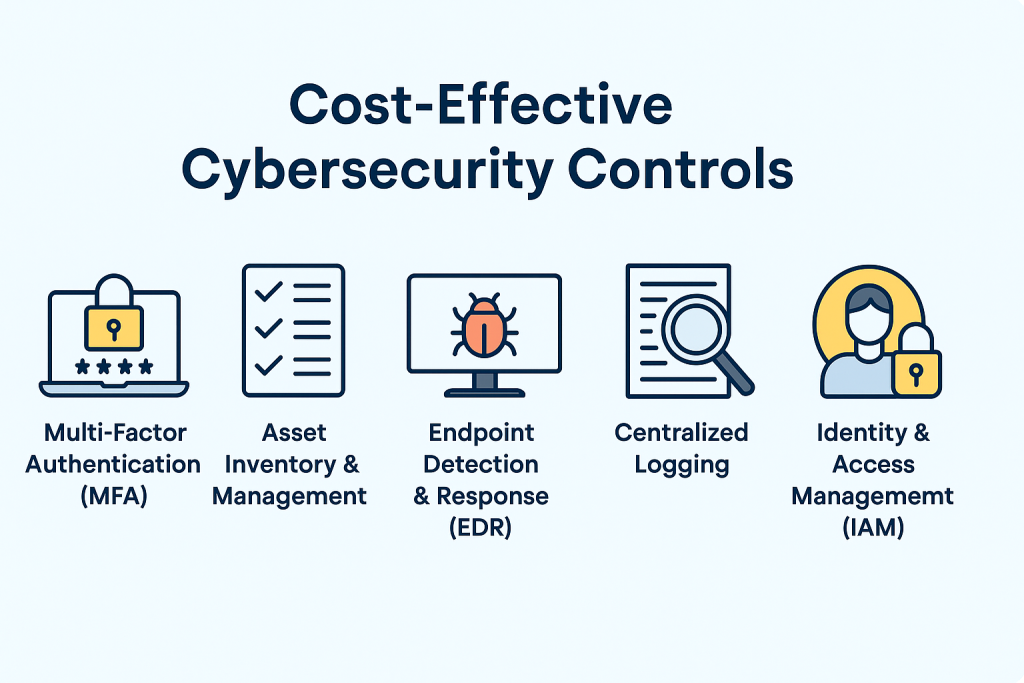
In this article, we’ll walk through five of the most valuable and affordable controls that every IT manager should consider first:
✅ Multi-Factor Authentication (MFA)
✅ Asset Inventory & Management
✅ Endpoint Detection & Response (EDR)
✅ Centralized Logging & Monitoring
✅ Identity & Access Management (IAM)
Let’s dive into how these tools work together to build a stronger, smarter cybersecurity foundation.
Why Cost-Effective Cybersecurity Controls Matter
Cybercriminals are no longer just targeting large enterprises. In 2024, nearly 43% of all cyberattacks targeted SMBs, many of which lacked the tools or staff to respond effectively. From ransomware to business email compromise, the threats are growing in both volume and sophistication—and IT managers are on the front lines.
One of the most common pitfalls for SMBs is overinvesting in complex or “trendy” cybersecurity tools while overlooking essential, foundational controls. Others make the opposite mistake: putting security on the back burner entirely due to perceived cost or complexity. Both approaches leave critical gaps that attackers are quick to exploit.
That’s why aligning cybersecurity investments with risk exposure—not just budget—is crucial. IT leaders must evaluate which security controls offer the highest impact at the lowest cost, especially in resource-constrained environments.
Rather than buying the biggest solution on the market, the smarter approach is to implement foundational and scalable controls first—solutions that provide immediate risk reduction and grow alongside your infrastructure. These include things like multi-factor authentication, endpoint detection, and asset visibility.
At CybertLabs, we specialize in helping businesses design Zero Trust strategies that are realistic, practical, and cost-effective. Learn more about how we tailor Zero Trust for SMBs on our services page.
Multi-Factor Authentication (MFA)
When it comes to cost-effective cybersecurity controls, few offer as much immediate impact as multi-factor authentication (MFA). It’s one of the simplest and most effective ways to stop unauthorized access—especially in environments where employees reuse passwords or access sensitive systems remotely.
MFA adds an extra layer of protection by requiring users to provide two or more forms of identity verification before granting access. This could be a password plus a code from an authenticator app, a biometric scan, or a hardware token. Even if credentials are compromised, attackers are blocked at the second layer.
From a return-on-investment perspective, MFA is a no-brainer. According to Microsoft, MFA blocks 99.9% of account compromise attacks—and many SMB-friendly options are free or low-cost.
Popular Tools for SMBs:
- Duo Security (now part of Cisco)
- Microsoft Authenticator
- Google Authenticator
- Authy (for cross-device syncing)
How to Implement MFA with Minimal Disruption:
Start by enabling MFA for high-risk users—like admins and anyone accessing sensitive data or external systems. Most major cloud platforms (e.g., Microsoft 365, Google Workspace, AWS) support MFA out of the box. From there, extend MFA to all users, including remote staff and contractors.
If you’re using a centralized identity provider like Okta or Azure AD, you can enforce policies across your environment in just a few clicks. Be sure to provide simple onboarding documentation and offer support during rollout to minimize friction.
Pro Tip for IT Managers:
Roll out MFA in phases. Start with privileged accounts, then expand to broader user groups. This reduces pushback, helps you troubleshoot on a smaller scale, and allows your team to track adoption rates before making MFA mandatory company-wide.
Asset Inventory & Management
When it comes to cybersecurity, you can’t protect what you don’t know exists. That’s why maintaining a complete and continuously updated inventory of your organization’s assets—devices, applications, and users—is one of the most critical and cost-effective cybersecurity controls.
For IT managers, asset inventory serves as the foundation for every other security control. Without it, patch management, endpoint protection, access control, and even compliance audits become guesswork. Attackers often exploit overlooked systems—like outdated printers, test environments, or shadow IT—because no one’s watching them.
Fortunately, modern asset management doesn’t require expensive enterprise-grade platforms. Many SMBs are finding success with open-source and low-cost tools like:
- Lansweeper – Excellent for automated asset discovery and reporting.
- Spiceworks Inventory – A free tool that’s great for network scanning and device tracking.
- GLPI – A comprehensive open-source IT asset management solution.
These tools can quickly identify all active devices on your network, catalog installed software, and flag outdated or non-compliant endpoints.
Compliance Advantage:
If your organization needs to comply with standards like NIST 800-171, CMMC, or HIPAA, asset inventory is not optional—it’s a baseline requirement. Regulators want to see that you have visibility into what’s connected to your environment and how it’s managed.
Patch Management Tie-In:
Accurate inventory makes patching significantly more effective. By knowing what devices and software versions are running, IT managers can deploy critical updates proactively—especially for high-risk systems exposed to the internet.
Pro Tip for IT Managers:
Make asset discovery continuous, not just a one-time project. Many attacks happen because new or forgotten devices aren’t secured. Use tools that support real-time scanning or periodic sweeps to maintain visibility over time.
Endpoint Detection & Response (EDR)
Traditional antivirus tools were designed for a different era—one where known threats could be stopped with signature-based detection. In today’s landscape, where fileless malware, ransomware-as-a-service, and zero-day exploits are rampant, legacy antivirus alone is no longer sufficient.
This is where Endpoint Detection & Response (EDR) comes in.
EDR provides continuous monitoring and advanced threat detection at the device level. It goes beyond basic antivirus by collecting telemetry data from endpoints, analyzing behaviors, and triggering real-time alerts when suspicious activity is detected. For IT managers, this means better visibility, faster response times, and the ability to isolate compromised devices before damage spreads.
What makes EDR one of the most cost-effective cybersecurity controls is its scalability and automation. Many solutions are lightweight, cloud-managed, and built specifically for SMBs—no security operations center required.
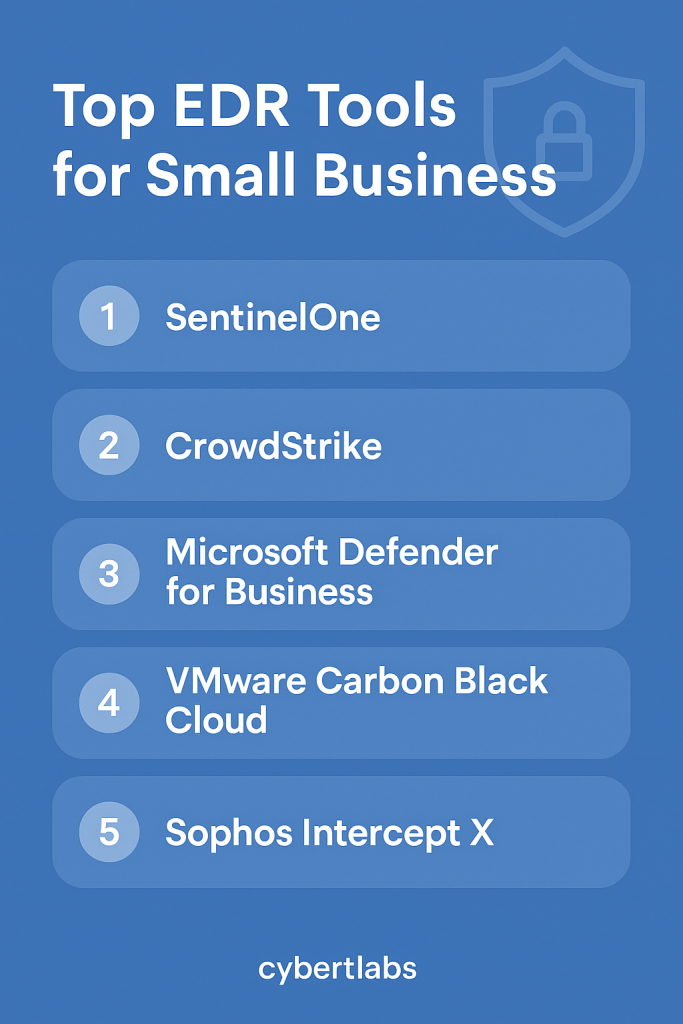
Affordable EDR Options for SMB IT Teams:
- CrowdStrike Falcon Go – A version of their enterprise product built for small teams.
- Microsoft Defender for Business – Integrated with Microsoft 365, great value if you’re already in that ecosystem.
- SentinelOne Core – Offers autonomous threat response and rollback capabilities.
Why IT Managers Should Prioritize EDR:
- Automated response: Quarantine and kill malicious processes before they spread.
- Root cause analysis: Trace how an attack started and which systems were impacted.
- Reduced dwell time: Stop threats in hours instead of weeks—before they escalate.
Pro Tip for IT Managers:
Pair EDR with your asset inventory system for full visibility. Ensure each endpoint is accounted for, monitored, and protected. If possible, integrate EDR alerts into your SIEM or logging dashboard to create a more centralized response workflow.
By adopting an EDR platform early, you’ll elevate your incident response maturity without breaking your budget—and dramatically improve your ability to detect and contain modern threats.
Centralized Logging & Monitoring
In cybersecurity, what you can’t see can hurt you. That’s why centralized logging and monitoring is one of the most critical — and cost-effective — cybersecurity controls IT managers can implement. It’s the heartbeat of any modern security operation, enabling proactive threat detection, incident response, and compliance reporting.
Without centralized logging, important signals — such as failed login attempts, privilege escalations, or lateral movement — remain siloed across servers, workstations, cloud apps, and firewalls. By aggregating these logs into a unified platform, IT teams gain real-time visibility across their infrastructure, allowing them to quickly spot anomalies and take action before an incident escalates.
Why Centralized Monitoring Matters for SMBs:
- Early detection: Detect threats before they cause widespread damage.
- Faster investigations: Correlate events across multiple systems to find root causes.
- Audit readiness: Generate reports and retain logs for compliance (e.g., NIST 800-53, HIPAA, PCI-DSS).
- Operational efficiency: Reduce manual troubleshooting by surfacing relevant events automatically.
Affordable Tools for Centralized Logging:
- Elastic Stack (ELK) – Powerful and open-source, great for teams with some technical experience.
- Graylog – Purpose-built for log management with a user-friendly interface.
- Security Onion – Includes SIEM, intrusion detection, and log analysis tools in one distro.
- Wazuh – Lightweight SIEM ideal for endpoint visibility and rule-based alerts.
Implementation Tips for IT Managers:
- Start by centralizing logs from critical assets: domain controllers, firewalls, cloud services, and EDR platforms.
- Set up basic alerting rules — such as multiple failed logins or activity outside business hours.
- Use dashboards to highlight key security metrics and provide visual context for decision-makers.
Even if you’re not ready for a full-scale SIEM, simply collecting and storing logs centrally puts your SMB lightyears ahead of many peers — and gives you a strong foundation to build on.
Pro Tip for IT Managers:
Pair your logging strategy with your EDR solution or firewall to create correlated alerts. Look for platforms that support integration via API or syslog to streamline your monitoring stack.
Identity & Access Management (IAM)
Identity & Access Management (IAM) is the backbone of a secure IT environment. It ensures the right people have the right access to the right resources — and nothing more. For SMBs, implementing IAM is not just about security; it’s about reducing friction in daily operations, especially as teams become more remote and cloud-dependent.
The principle of least privilege (PoLP) is foundational here: users should only be given access to the data and systems necessary for their specific job roles. Without this control in place, SMBs risk giving users overly broad access — which increases the likelihood of insider threats, accidental data leaks, or unauthorized system changes.
Why IAM Is a Cost-Effective Cybersecurity Control:
- Streamlines onboarding and offboarding: Provision or de-provision accounts in minutes across all systems.
- Prevents privilege creep: Automates role-based access control (RBAC) to ensure users don’t accumulate unnecessary permissions over time.
- Supports compliance: Many standards (e.g., SOC 2, HIPAA, NIST) require documented access controls and audit trails.
SMB-Friendly IAM Tools:
- JumpCloud – A great all-in-one identity platform with cloud directory, MFA, and device management.
- Microsoft Entra ID (formerly Azure AD) – Especially valuable if your organization uses Microsoft 365.
- Okta Workforce Identity – Ideal for managing cloud access across apps and users.
Implementation Tips for IT Managers:
- Start with an inventory of all systems requiring user access: email, cloud storage, SaaS apps, file servers, etc.
- Define user roles clearly (e.g., HR, Finance, Dev, Contractor) and assign baseline access templates.
- Use IAM tools to automate user provisioning, enforce MFA, and enable real-time deactivation when employees exit the company.
Pro Tip for IT Managers:
Integrate IAM with your SSO and MFA policies for maximum protection. When paired with logging, IAM also makes audits and investigations far more efficient by giving you a single source of truth for who accessed what and when.
How to Prioritize and Roll Out These Controls
Rolling out cybersecurity controls doesn’t have to be overwhelming—especially if you take a phased, strategic approach. For IT managers, the key is to prioritize based on risk, cost, and ease of deployment.
Start by assessing your environment and asking:
- Where are we most vulnerable right now?
- What’s the potential impact of a breach in that area?
- How quickly can we implement a fix with our current resources?
This helps you develop a prioritization matrix. For most SMBs, quick wins like Multi-Factor Authentication (MFA) and Asset Inventory & Management offer immediate security benefits without major investment or disruption.
After securing easy wins, move on to more integrated solutions like Endpoint Detection & Response (EDR), Centralized Logging, and Identity & Access Management (IAM). These tools can be layered in as your infrastructure matures.
Most importantly, tie these efforts back to a bigger strategy, whether that’s adopting a Zero Trust architecture or aligning with compliance standards like NIST 800-171 or CIS Controls. This ensures your security program not only protects your data but also positions your business for growth and credibility.
Common Implementation Patterns from Real SMBs
Across industries—from healthcare clinics to boutique law firms—small businesses are making measurable progress by focusing on a handful of foundational cybersecurity controls.
For example, many SMBs begin by rolling out Multi-Factor Authentication (MFA) organization-wide, which is consistently ranked among the lowest-cost and highest-impact defenses against phishing. Tools like Microsoft Authenticator and Google Authenticator are favored for their ease of use and low friction with employees.
Next, organizations often deploy basic asset inventory tools like Lansweeper or Spiceworks to identify outdated or unprotected devices. This visibility enables IT managers to spot risks quickly and enforce policies more consistently.
Some small businesses also integrate endpoint protection using Microsoft Defender for Business, SentinelOne, or CrowdStrike Falcon Go—solutions designed with SMB budgets and admin overhead in mind. When paired with lightweight logging platforms like Wazuh or cloud-native log services, these tools help flag suspicious activity before it becomes a breach.
Lastly, the adoption of JumpCloud or Microsoft Entra ID (formerly Azure AD) for Identity and Access Management (IAM) enables SMBs to implement role-based access, reduce overprivileged accounts, and simplify offboarding processes.
These patterns show that with the right sequence and tools, even the smallest IT teams can dramatically elevate their cybersecurity posture without the need for enterprise-level budgets.
Final Takeaways & Next Steps for IT Managers
For SMBs, cybersecurity doesn’t have to be expensive—it just has to be strategic. By focusing on foundational controls like MFA, inventory, endpoint protection, logging, and IAM, IT managers can drastically reduce risk without blowing their budgets.
These five controls aren’t just best practices—they’re building blocks. Whether you’re looking to implement a Zero Trust model, improve compliance, or just get ahead of cyber threats, this roadmap provides a smart place to start.
Want help prioritizing cybersecurity controls for your IT team? Schedule a free consult with CybertLabs. Let’s build a stronger foundation, together.